
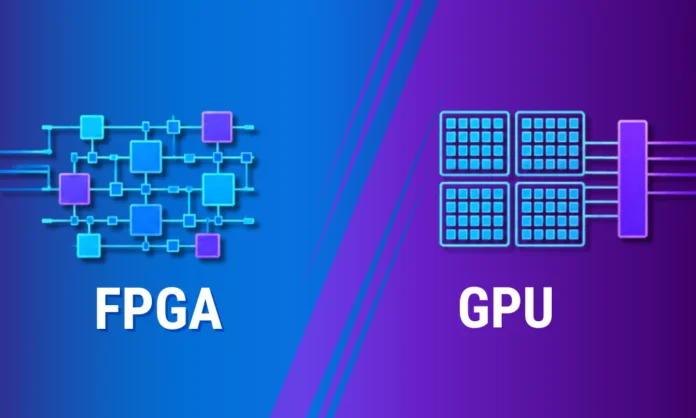
As demand for computational workloads grows, the need for efficient, specialized hardware accelerators increases. There has been a lot of buzz about Field-Programmable Gate Arrays (FPGAs) and Graphics Processing Units (GPUs) for processing demanding AI/ML applications. As cloud computing, big data, robotics, and other technologies emerge, they require greater processing power. Data reports by 2030, the computing power market is projected to generate 70.7 billion in revenue, that’s a huge number.
Both FPGAs and GPUs are designed to power computing workloads; however, they differ in ways you should know. GPUs can handle a large number of calculations simultaneously due to the multiple cores and dedicated memory, whereas FPGA offers lower latency and can be reprogrammed for high-end applications. This blog compares FPGA vs GPU, alongside their performance, power, cost and differences to help you make a well-informed decision for your application.
What is FPGA?
A field-programmable gate array (FPGA) is a programmable silicon chip that can be reconfigured to suit a range of applications. It differs from application-specific integrated circuits (ASICs), which are designed for specific purposes. They can be reprogrammed at the hardware level to implement custom logic and functionality for specific tasks. FPGAs are known for providing maximum flexibility, mainly in custom, low-latency applications.
Components of FPGA:
- Configurable Logic Blocks (CLBs)
- Input/Output Blocks
- Digital Signal Processing (DSP) Units
- Memory Blocks
Key Features of FPGA:
- FPGAs can be easily configured with FPGA hardware description languages (HDL) or VHDL to support custom logic or new functionality.
- It can use less power than other processors, reducing operational costs.
- FPGAs connect directly to several hardware interfaces without intermediate layers.
- Offers greater flexibility to fine-tune hardware and improve efficiency.
What is a GPU?
GPU stands for graphics processing units. It is one of the most commonly used computing technologies today for personal and business computing. A GPU excels at performing general-purpose parallel processing; however, it was initially designed for graphics and video rendering. NVIDIA first marketed the single-chip GeForce 256 GPUs in 1999. Beyond graphics, GPUs are becoming an ideal choice for artificial intelligence (AI), computer vision, machine learning, and more.
Components of a GPU:
- Cores (CUDA Cores, Stream Processors)
- L2 Cache
- Memory Controller
- APIs
- Development tools such as NVIDIAs cuDNN
Key Features of GPU:
- GPUs are ideal for high-compute tasks like high-performance computing (HPC) and deep learning applications.
- They include built-in hardware encoders that efficiently handle high-quality video, streaming, and exporting with less performance impact.
- Thousands of small cores, such as CUDA cores, work simultaneously to handle large numbers of calculations.
- Has high-speed dedicated memory that stores active textures, rendering data, and more.
FPGA vs GPU: A Quick Rundown of Differences
Take a look at the primary differences between FPGA and GPU.
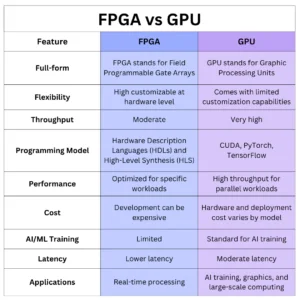
Let’s understand the differences in more detail.
Performance
Performance is one of the most critical factors when choosing between FPGAs and GPUs. Performance mainly depends on the workload type.
GPUs outperform FPGAs in computing throughput, for example, for floating-point calculations. Their multiple processing cores allow them to perform thousands of calculations simultaneously. For example, a high-end GPU can deliver 100 TFLOPs (trillion floating-point operations per second) for single-precision calculations, while FPGAs can reach around 10 TFLOPs. When it comes to latency, GPUs introduce higher latency because of their memory architecture.
FPGAs follow a different approach. Rather than executing instructions through a fixed processing architecture, they create customized hardware pipelines. So, basically, FPGAs are optimized for specific workloads. When it comes to latency, FPGAs excel at lower latency.
The next difference between FPGAs and GPUs is precision. GPUs are optimized for floating-point operations such as FP32, BF16, and FP16. Whereas FPGAs are optimized for reduced precision.
Power Consumption
Today, energy consumption has become an important consideration when choosing hardware for AI and HPC workloads. FPGAs and GPUs differ in these areas:
According to research, FPGAs are more energy efficient than GPUs, consuming 3 to 10 times less power for similar workloads. This power savings makes them ideal for implementing custom circuits that use only the components required for particular tasks.
GPUs, on the other hand, need more electrical power when handling heavy workloads such as AI training, deep learning, and HPC models.
Thus, in terms of power consumption, FPGAs excel.
Cost Factor
Cost is an important factor when choosing computing hardware. At first glance, GPUs look expensive; data center GPUs can cost thousands of dollars per unit. However, their cost should be evaluated in context. They also benefit from mature ecosystems, development tools, software ecosystems, and more. This reduces development time and makes deployment easy.
On the other hand, high-performance FPGAs with high logic capacity and performance can be more expensive than GPUs. Often, the cost of designing and optimizing FPGA AI accelerators is high because the required expertise is expensive.
Choosing Between FPGAs and GPUs: The Right Accelerator
The choice between FPGAs and GPUs isn’t just about specification differences; it’s about choosing the one that meets your application needs. Below is a summary of the key considerations:
Choose FPGAs when:
- Your application requires hardware-level customization.
- Power efficiency is the key concern.
- You need more control over hardware functionality.
- Low-latency and deterministic timing are important.
Choose GPUs when:
- You need high computing throughput.
- You need to work with large-scale deep learning models.
- You want to cut down on development time.
- You work with large datasets and parallel architecture.
Final Words!
Choosing between FPGAs and GPUs is an important decision. It depends on your application, performance needs, and budget. As technology continues to make big leaps, understanding the key differences between them will help you build a more efficient computing system.
While GPUs excel at AI model training, graphics processing, and large-scale parallel workloads, FPGAs offer low-latency, customization options, and energy efficiency mainly for specialized applications. In the near future, we can envision GPUs with improved power efficiency and FPGAs with higher computational capacity and lower cost.
Visit our website to read more informative blog posts.
FAQs
1] Can I use an FPGA as a GPU?
Answer: Yes, FPGA can be programmed to function similarly to a GPU, ASIC, or other configurations. They can be programmed and optimized for specific algorithms, which work best for workloads where general-purpose hardware is not sufficient.
2] Which consumes less power, FPGA or GPU?
Answer: FPGAs consume less power for specialized tasks because their hardware can be optimized for particular operations. GPUs generally need more power for demanding computing workloads.
You May Also Like:
What is AI Observability and Why Does it Matter for Production Machine Learning Systems?
Revolutionizing Your Liquidity Management Strategy: The Power of AI and Machine Learning