

Virtualization refers to technology that allows you to create an abstract layer over physical systems. It uses special software known as a hypervisor. Digital services are rapidly extending, and businesses are constantly demanding systems that are ductile, economically efficient, and ubiquitous.
Handling several systems on distinct physical machines is not just a daunting task but also leads to inefficiencies and higher costs. The most significant approach is, instead of having a single physical system, to use an open-source virtualization platform.
Market reports reveal that the global virtualization market size is anticipated to grow from USD 13,680 million in 2026 to USD 20,352 million by 2034, exhibiting a CAGR of 7.0% during the forecast period.
Let us dive deeper into this blog and understand what virtualization is and how to choose the right open source virtualization platform.
What is Open Source Virtualization?
Open source virtualization is a modern technology that facilitates free, open, and mutable creation of virtual versions of physical systems such as computers, servers, storage, or even networks. It has become a fundamental approach for modern IT infrastructures. For instance, a laptop generally works on a single operating system. With the help of virtualization, the same laptop can run multiple operating systems such as,
- Windows
- Linux
- iOS
It helps streamline workloads across a variety of domains. Below, we have mentioned the top 5 open-source virtualization platforms.
Top 5 Open Source Virtualization Platform
1] KVM Kernel-based Virtual Machine
KVM is one of the popular open source virtualization modules in the Linux kernel that allows the kernel to run as a hypervisor. It allows users to run multiple virtual machines with superior performance, making it ideal for enterprise and cloud environments. KVM is an excellent solution for Linux on X86 hardware with virtualization extensions AMD-V and Intel.VT. This platform converts the Linux OS into a powerful virtualization platform while maintaining security and stability.
Key capabilities:
- KVM actively supports live migration
- Can use any storage supported by Linux
- Can run on a wide range of hardware platforms
2] XenProject
XenProject is one of the most stable, secure, and high-performing open source hypervisor technology. It is available for both original and modified guests on Linux and Windows and allows multiple operating systems to run on same physical hardware simultaneously. It works well in cloud computing, server virtualization, embedded systems, and more.
Key Capabilities:
- Flexible architecture allows vendors to create Xen based products
- Comes with key security features like KCONFIG
- Widely used in large-scale cloud infrastructure
3] Virtual Box
Virtual Box is a free, open-source hypervisor developed by Orache that allows users to run multiple, different operating systems including Linux, Windows, and MacOS on a single physical machine. IT teams and providers make use of Virtual Box to cut down operational costs, and reduce the time required to deploy applications on on-premises cloud.
Key capabilities:
- Virtual Box is a cross platform compatible.
- Creates isolated virtual environments that act as a single computer.
- Allows file sharing between host and guest operating system
4] OpenNebula
Built on open source and designed for complete control, flexibility, and scalability, the OpenNebula platform delivers end-to-end coverage, vendor neutrality, and comprehensive support across cloud and virtualization management, hypervisor operations, and Kubernetes orchestration.
Key Capabilities:
- Centralized management of virtual machines, containers, and cloud resources
- Support for multiple hypervisors like KVM and VMware
- Hybrid and multi-cloud orchestration capabilities
5] Proxmox
Proxmox virtual environment is a secure, and open-source virtualization platform. It comes with a built-in interface that lets you manage VMs and containers easily. This open source virtualization platform is ideal for IT environments, with a lower budget.
Key capabilities:
- Online control panel to keep track with ease.
- Live migration, restore, and backup features.
- High availability (HA) clustering.
Factors to Consider While Choosing the Right Open-Source Virtualization Platform
An open-source platform is a comprehensive environment or system that supports the development and deployment of multiple applications. It is of major importance that you select an appropriate open source virtualization platform server that aligns with your business needs.
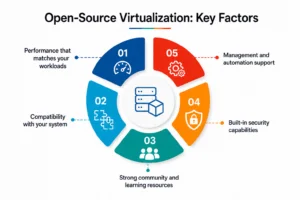
1. Performance that matches your workloads
Businesses or individuals should consider a platform that meets their specific needs and essential performance metrics for their workload. It will help prevent performance degradation instantly. As the requirement grows, the open source virtualization platform should be able to maintain and scale performance consistently. There should be minimal upgrades or adjustments while you are running a few virtual machines or managing heavy applications.
What to consider:
- Ability to run multiple virtual machines without lagging
- Make efficient use of RAM, CPU, and storage
- Should perform consistently under heavy workloads
2. Compatibility with your system
For the existing operating systems and hardware, the open source virtualization platform should work seamlessly, which is paramount for businesses. For better performance and stability, it is important to use technologies like Intel VT-x or AMD-V.
If you disregard the compatibility factor, you will be facing performance issues, crashes, or unnecessary troubleshooting later.
What to consider:
- Support for your operating system
- Hardware compatibility, such as processor, memory
- Requirement of additional configurations or drivers.
3. Strong community and learning resources
Open source platforms rely heavily on community support. Strong community and learning resources help solve problems. This collaborative nature of open-source platforms resolves issues faster and helps learn advanced features more effectively. A platform with active forums and detailed documentation makes problem-solving much easier
What to consider:
- Availability of tutorials and guides
- Active forums and discussion groups
- Consistent frequency of community contributions and updates
4. Built-in security capabilities
Security is paramount for organizations when running virtual systems. A good open source virtualization platform must render proper isolation along with features like access control and regular security updates. It reduces the risk of data breaches and attacks.
What to consider:
- Isolation between virtual machines
- Access control and permission settings
- Regular security updates and patches
5. Management and automation support
As organizations are turning towards open source virtualization platforms, a key aspect is their flexibility, and they support automation. With effective management features, managing multiple virtual machines becomes easier. It helps improve efficiency and allows performing routine tasks without manual intervention.
What to consider:
- Support for automation tools or scripts
- Centralized management options
- monitoring and reporting features
Final Thoughts
Selecting the right open source virtualization platform depends on how well it satisfies your needs. Factors such as performance compatibility and security are crucial; however, management and automation support bring about a radical difference. Scrutinizing these aspects carefully will help you choose a reliable and flexible virtualization environment.
Head over to our official website for more useful information.
FAQS
1. What is an open source virtualization platform used for?
Answer: An open-source virtualization platform (like KVM, Xen, or Proxmox VE) is used to:
- Run multiple virtual machines (VMs) on a single physical computer
- Optimize hardware usage (CPU, RAM, storage)
- Create isolated environments for testing, development, or security
- Deploy servers and cloud infrastructure at a lower cost
- Enable easy backup, migration, and scaling of systems
2. What is virtualization
Answer: Virtualization is the process of creating a virtual version of a physical resource, such as a virtual machine or storage device.
- A computer (virtual machine)
- Storage device
- Network
Instead of running one OS on one physical machine, virtualization lets you run multiple operating systems on the same hardware using software called a hypervisor.
3. What are the three types of virtualization?
Answer: The three main types are the following:
- Hardware Virtualization
- Operating System-Level Virtualization
- Desktop Virtualization
4. Which OS is best for virtualization?
Answer: Depending on the use case, commonly used OS are as follows:
- Best overall (enterprise & performance):
– VMware ESXi
– Proxmox VE
- Best open-source option:
– Linux-based systems like Ubuntu Server or CentOS with KVM - Best for beginners / personal use:
– Windows 11 with Hyper-V
– VirtualBox
Also Read:
6 Best Open Source Virtualization Servers
Levels of Virtualization Implementation in Cloud Computing
Requirement and Purpose of Virtualization in Cloud Computing